On Demand Features

Build-Your-Own Subscription Box
Let customers take control of their subscriptions! They can handpick products, customize delivery preferences, and enjoy a tailored shopping experience every time with Subscription Box

One Time Purchase
Admins can set up subscription pricing for one-time purchases of products, allowing customers to pay a one-time fee for subscription access, offering greater flexibility in pricing

Membership Plan Product Purchase
Auto-reward membership on product purchases; this will encourage customers to purchase a specific product that you want so they can be a part of an exclusive members group.

Restrict Posts For Non-Members
As a store owner, you can easily restrict access to non-members for exclusive posts; this can be a special announcement, an exclusive members-only guide to something special, or any upcoming sale details.

Restrict Products For Non-Members
Restrict Access to products so only members can purchase. This will encourage non-members to purchase a membership to join the exclusive club.

Restrict Pages For Non-Members
Restrict access to non-members for exclusive pages; it can be store guidelines for members, a special return policy for members, or anything else you would like to write on that page that should be exclusive to members.

Variable Subscription Features
Store owners can allow subscriptions on simple and variable products. Admin can enable users to upgrade or downgrade variable subscription plans.

Allow Customer To Select Subscription Expiry Date
Subscriptions for WooCommerce pro plugin allows the admin to be provided with settings to allow users to select the Subscription plan expiry dates.

Offline Payment Method for Subscription
Accept automatic recurring payments, merchants can also enable offline payments for plans where the payment link is sent to the customer via email.

AI Based Analysis and Reporting
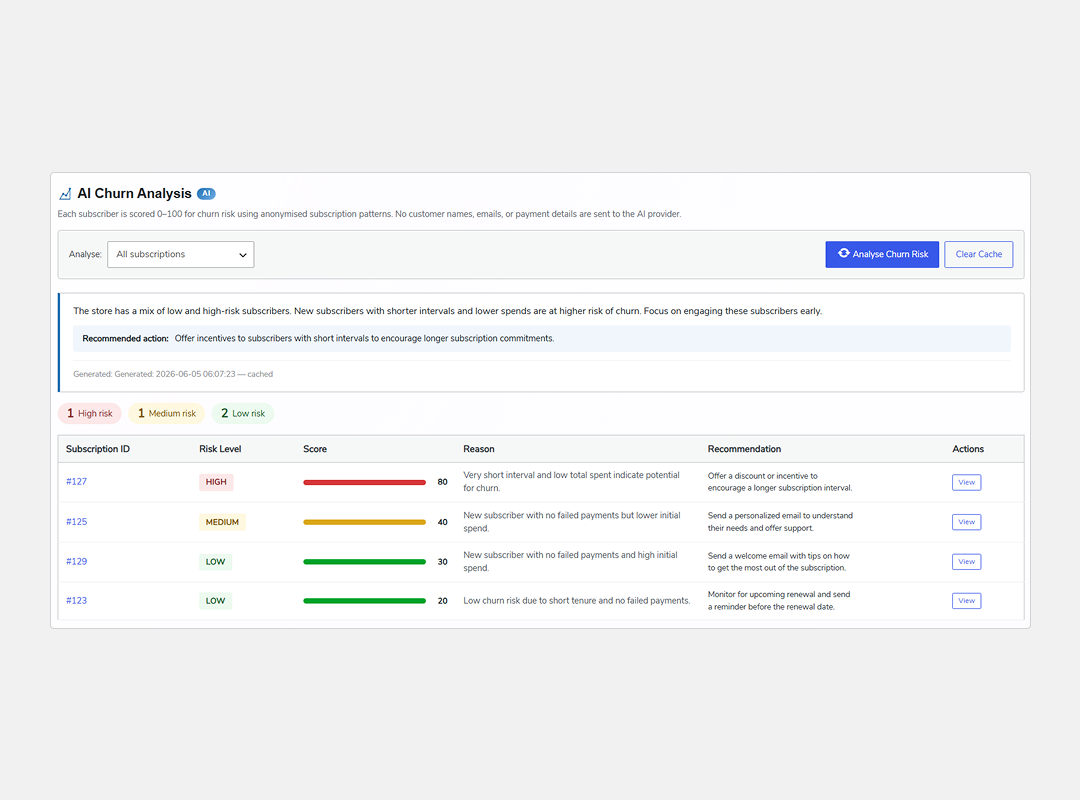
AI Churn Analysis
AI-based churn analysis gives you a detailed analysis of subscriptions that are at high risk of cancellation, and it also explains the possible reasons behind the churn and recommends actionable steps that you can take to improve customer retention
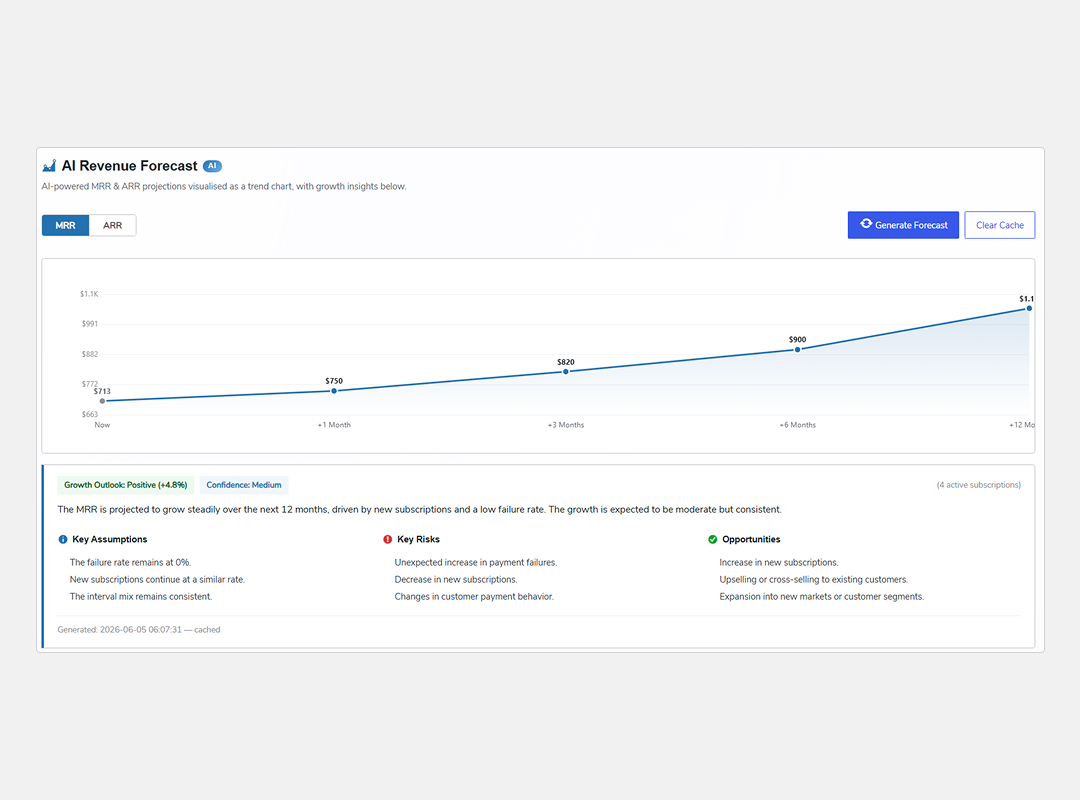
AI Revenue Forecaster
With AI revenue forecaster system, you get detailed predictions on your monthly and yearly revenue along with key insights into future subscription performance. The AI highlights potential risks and growth opportunities along with key steps to help you make smart decisions.
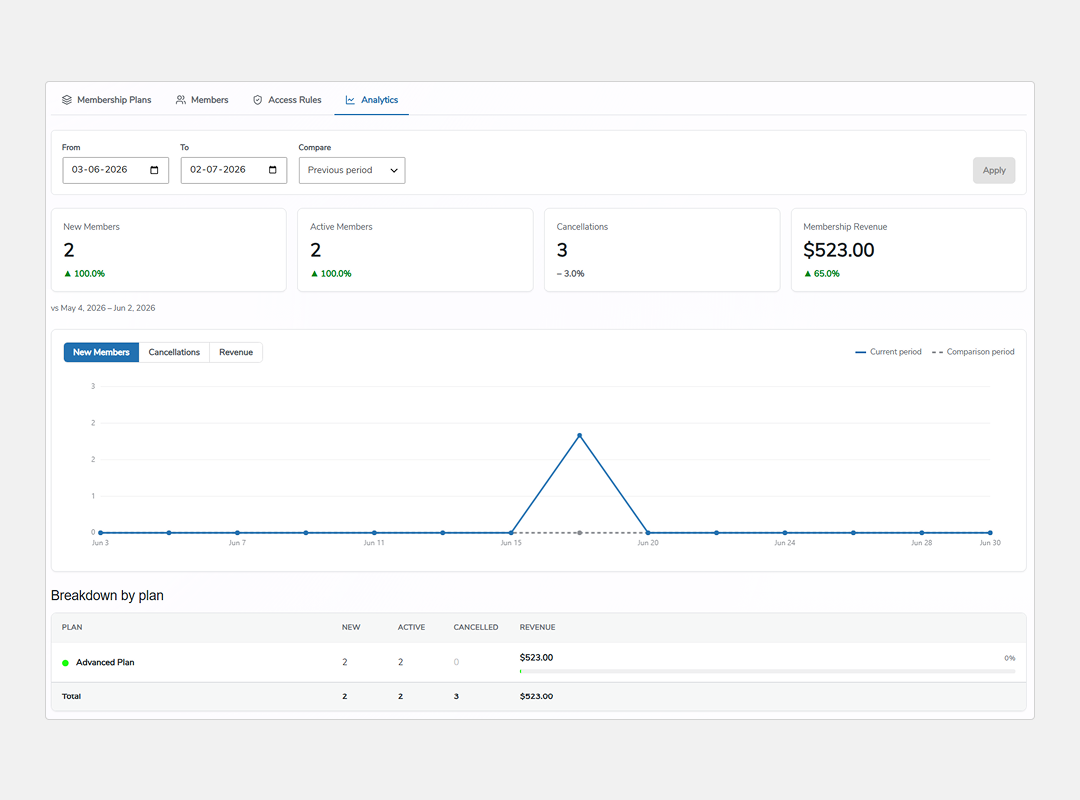
Membership Analytics
Access detailed analytics to get deeper insights into your membership performance, track new members, active members, recurring revenue, and more. Plus, you can see a detailed breakdown plan-wise and filter this data by a specific date range.
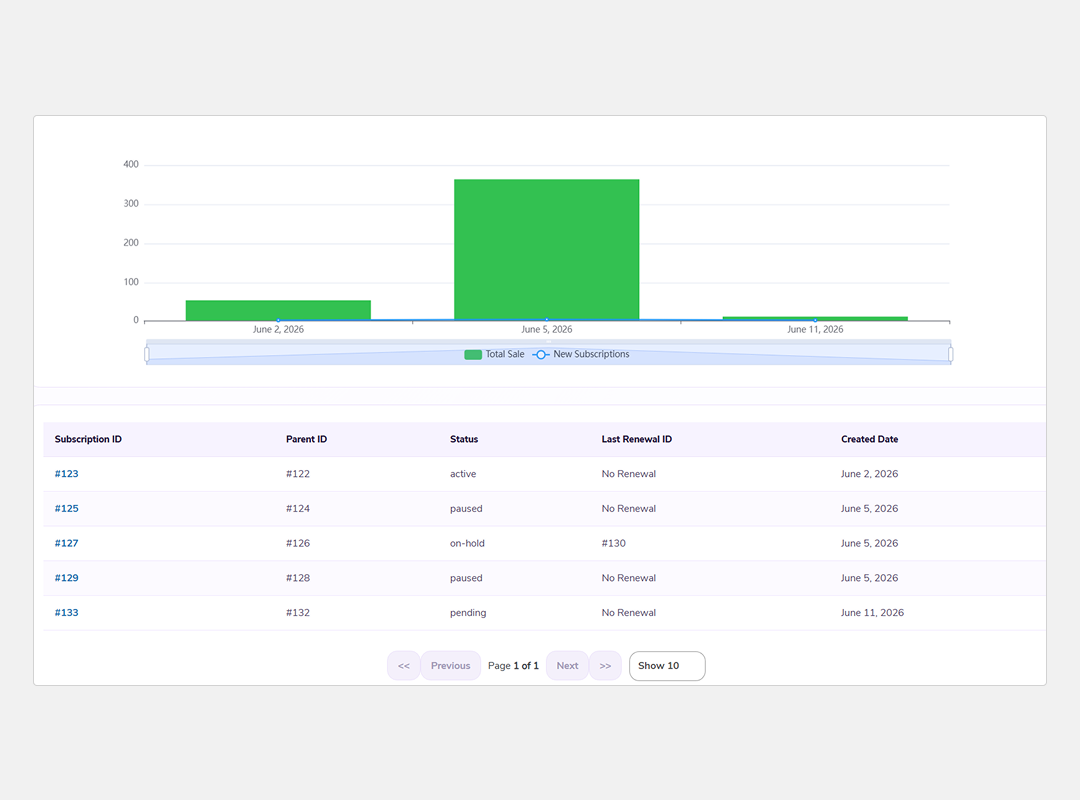
Detailed Graph and Table Report
Advanced Report View gives admins with a detailed and user-friendly way to monitor subscription performance. It includes a combination of a calendar and graphs, making it easy to visualize key subscription metrics.
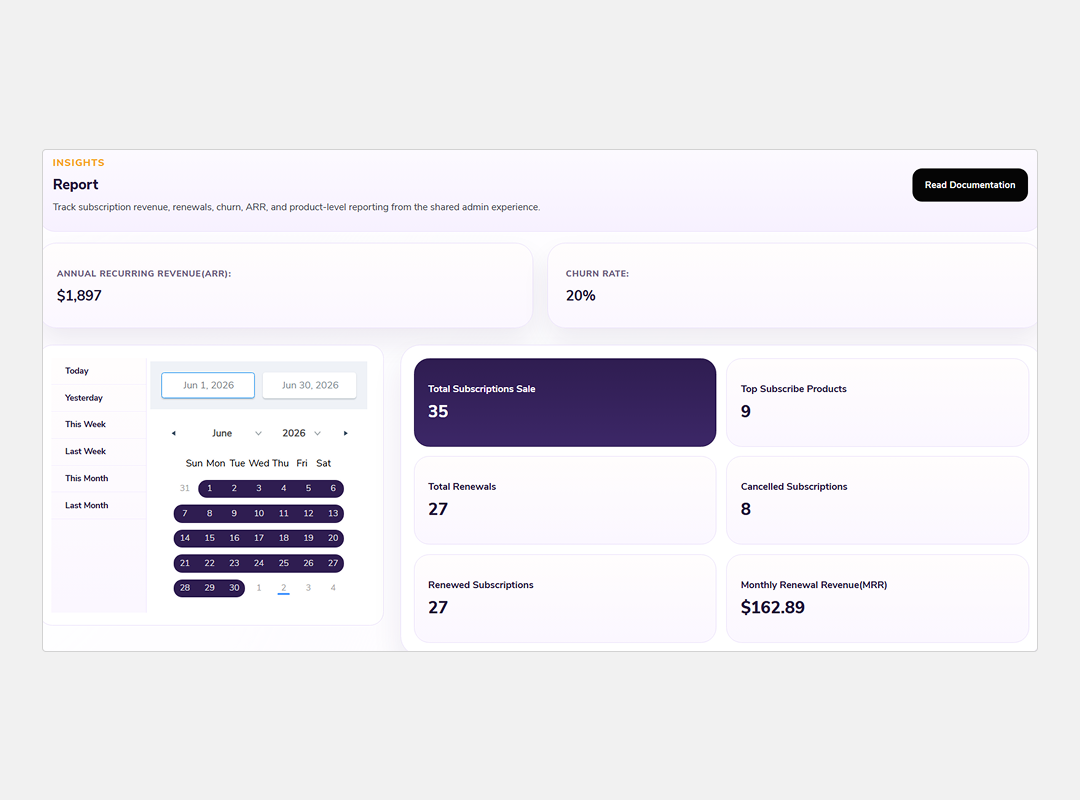
Insights for Churn Rate And Recurring Revenue
Churn rate and recurring revenue insights include dedicated tabs to monitor subscription churn rate and Average recurring revenue (ARR), making it easy to visualize key subscription metrics. Admins can filter reports by specific date ranges, giving them better control over the data.
More Splendid Features
WooCommerce PayPal Standard Payment Gateway Compatible
Subscriptions for WooCommerce pro is compatible with WooCommerce PayPal Standard Payment Gateway
Exclusive Coupon Types With Subscriptions for WooCommerce Pro
The Subscription for WooCommerces Pro enables admin to create exclusive coupons for customers.
One Time Subscriptions
Now, Customers can make a single purchase of a product via a one time payment
Subscription Plans Details
Admin can get to know the detailed information about the WooCommerce subscriptions on the subscription table tab of the plugin.
Automatic Retrying for Failed Products
This WooCommerce Subscriptions Pro plugin lets merchants re-attempt a failed recurring payment of a particular WooCommerce subscription plan.
Allow Multiple Quantities on Subscription Products
This WooCommerce subscription plugin allows customers to add multiple quantities of a specific product as a subscription item.
Compatible with WooCommerce Payment
Subscriptions for WooCommerce Pro is compatible with Woocommerce Payment to make payment simple.
Supported Payment Integrations












Frequently Asked Questions
Yes, the Admin can create subscriptions with variable type products by using this plugin.
Yes, the Admin can give the permission to the client to set the expiration date of the plans from the advanced setting of the plugin. Then the customers can choose the expiration date of the subscription plans by themselves.
Yes, the admin can enable automatic retrial of subscription payments on failed attempts from the advanced setting of the plugin backend.
Yes, the admin can set the maximum number of failed attempts after which the subscription plan is cancelled from the advanced settings of the plugin backend.
Yes, the admin can set a particular date for a month for the recurring subscription payment for a user.
Yes, the admin can allow users to pause and reactivate the subscription plans from the advance setting of the plugin backend.
Yes, admin can enable the functionality to pay manually for subscription plans from the advance setting of the plugin backend. For recurring payment, an invoice is sent to the customer through email so that they can make the payment manually.
Yes, the admin can enable the functionality to allow users to upgrade or downgrade variable product type subscription plans from the advance settings in the plugin backend.
Let us clear the hurdles in your pathway
Get in touch with us and let us break all the barriers resisting your business growth. Since we’re always available, you’ll get a flashing response once you contact us.